
Compatibility
Verification
Tags
OpenClaw Code Agent



openclaw-code-agent runs Claude Code, Codex, and experimental OpenCode as managed background coding sessions from OpenClaw chat. It adds plan approval, session lifecycle, wake routing, worktree isolation, merge/PR follow-through, and explicit goal loops on top of the agent backends.
Use it when you want to start coding work from Telegram, Discord, or another OpenClaw-supported channel and keep the job observable after the first message.
Highlights
- Plan -> Review -> Execute.
planis the default launch mode, and plan approval defaults todelegateso the orchestrator reviews the full plan before approving or escalating to the user. - Delegated worktree isolation. New sessions default to
delegate; opt intoask,off,manual,auto-merge, orauto-prwhen you want a different branch follow-through policy. - State-driven decision UX.
asksends explicit action buttons for Merge, Open PR, Later, and Discard. The same action-token model backs Telegram and Discord interactive callbacks. - Lifecycle-first cleanup. Worktrees are temporary task sandboxes. The plugin distinguishes
mergedfromreleasedso different-SHA branches whose content already landed on the base branch can still be cleaned safely. - Routed outcome summaries. Merge and PR actions deliver the canonical status first, then wake the orchestrator to send one concise factual follow-up in the originating chat/thread.
- Full session lifecycle. Suspend, resume, fork, interrupt, and recover sessions across restarts with persisted metadata and output.
- Explicit goal-task loops. Opt into verifier-driven repair loops or Ralph-style completion loops when you need iterative autonomous execution toward a specific goal.
- Real operator visibility.
agent_sessions,agent_output, andagent_statsshow status, buffered output, duration, and USD cost. - Multiple harnesses, one control plane. Claude Code, Codex, and experimental OpenCode share the same tools, routing, notification pipeline, and worktree strategy model while each backend uses its own adapter and resume substrate.
- One continuation path. Follow-ups, approvals, revisions, interrupts, and redirects all continue the existing session instead of launching a duplicate.
This plugin is separate from OpenClaw's bundled acpx runtime plugin and bundled core codex plugin. Those own adjacent OpenClaw runtime/provider surfaces; openclaw-code-agent owns chat orchestration and repository follow-through for its own Claude Code, Codex, and experimental OpenCode harnesses. See docs/ACP-COMPARISON.md for the boundary details.
From Chat To Resolved Work
- Ask OpenClaw to launch a coding session from chat.
- Choose the review style you want: direct execution, user plan approval, delegated review, or explicit worktree decisions.
- Let the agent finish in an isolated worktree when branch follow-through is enabled.
- Merge into the base branch, open a PR, defer the decision, or discard the sandbox from the same thread.
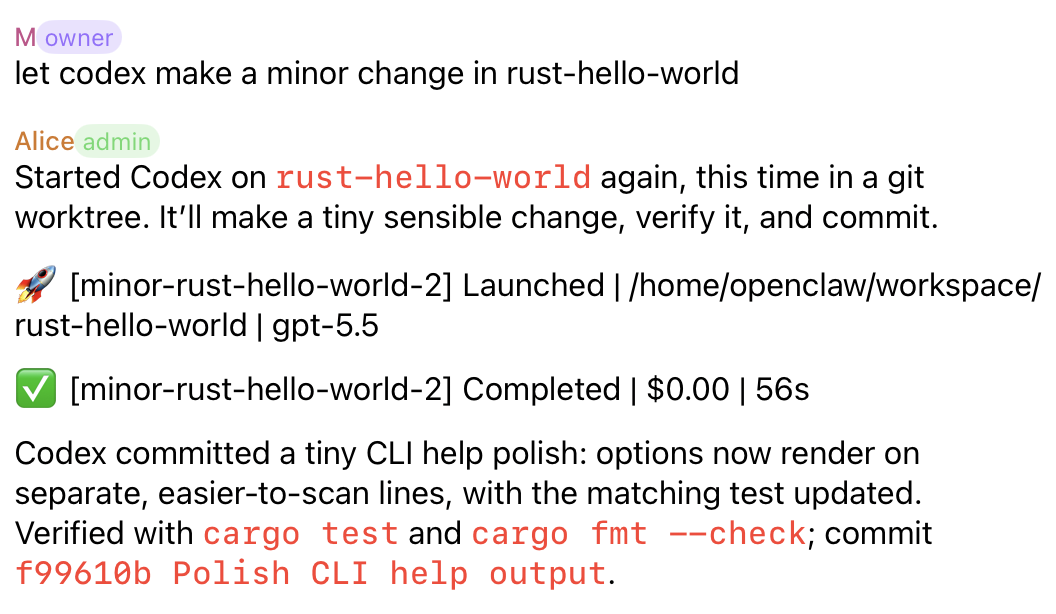
Direct Completion
For small trusted changes, an orchestrator can launch a session, let the selected harness finish, and report the verified outcome back to chat. The session stays observable through launch, completion, cost, duration, and commit summary.
Plan Review
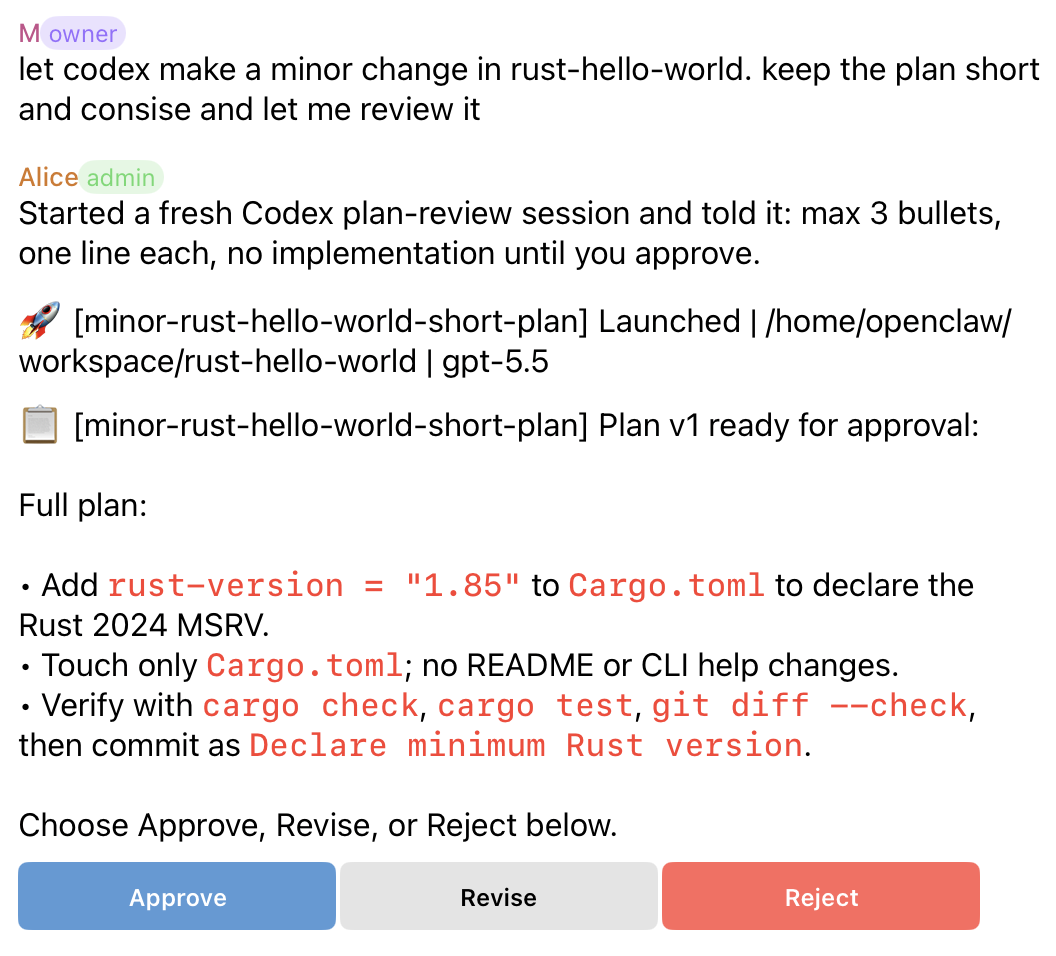
The default review loop is plan-first. Claude Code, Codex, and experimental OpenCode feed the same approval UX: the plugin blocks implementation until approval, then continues the same session after the plan is approved. Codex can provide structured plan artifacts; OpenCode is currently treated as text-only with plugin-owned plan gating. The user can approve, request a revision, or reject the plan from the originating thread.
Worktree Decisions
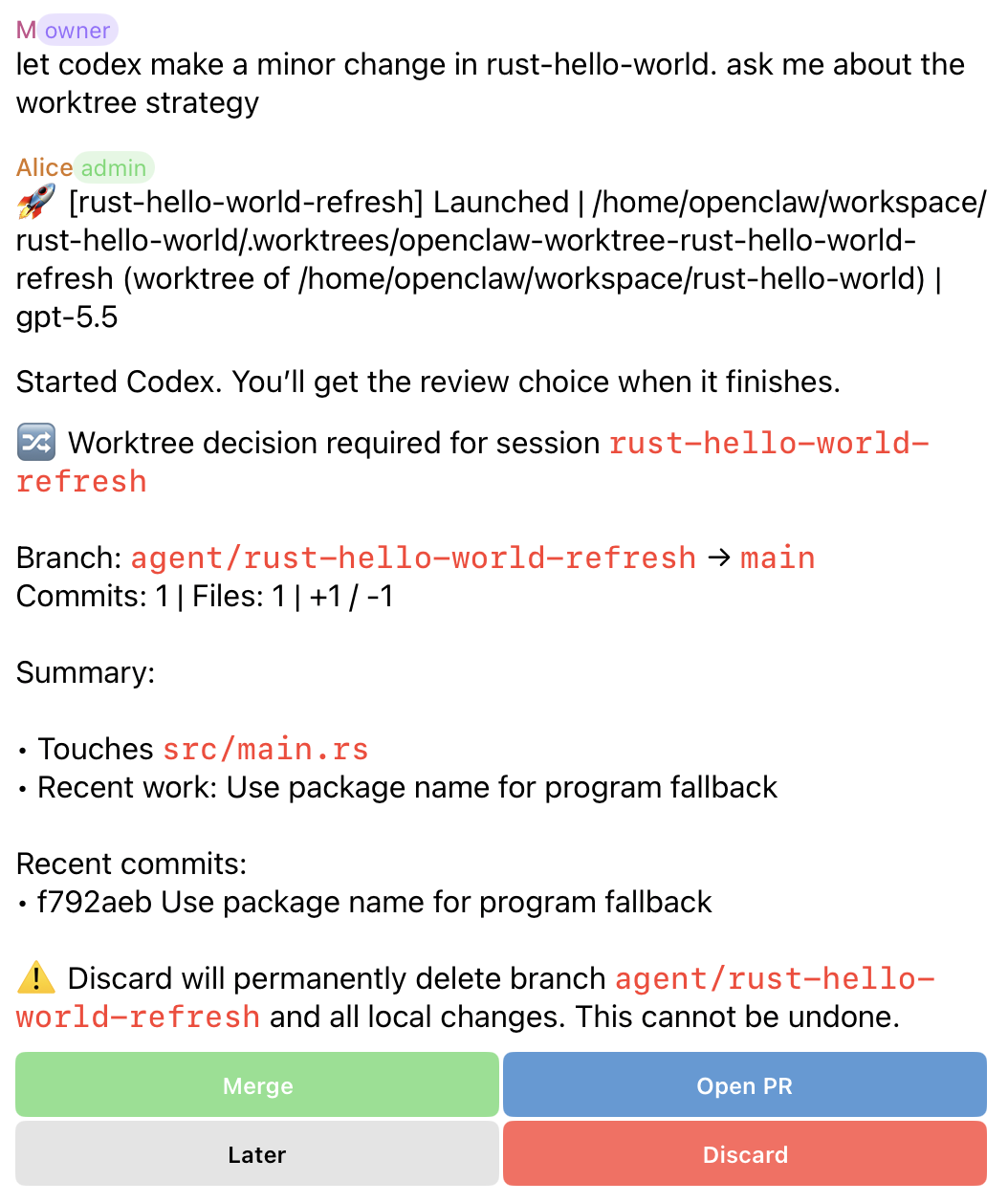
In ask, the user controls branch follow-through after the agent finishes. Current buttons adapt to state: new branches can show Merge, Open PR, Later, and Discard; branches with an existing PR can show View PR and Sync PR instead of Open PR.
Delegated Worktrees
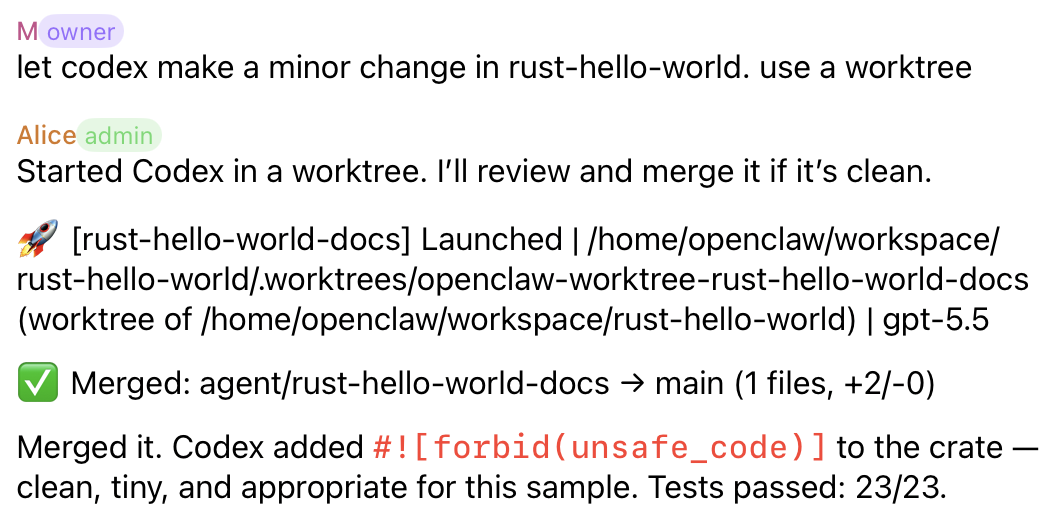
In delegate, the orchestrator reviews the completed worktree and attempts the merge follow-through when the change is clean. The agent edits files in the managed worktree so the main checkout is not touched during implementation; after review, delegated follow-through merges the finished branch back to the base branch unless a conflict, error, or explicit policy requires escalation.
After merge or PR follow-through, the plugin sends the canonical status line and wakes the orchestrator to read the full session output and send the routed factual summary. That summary is orchestrator-owned, so it preserves the original chat/thread instead of depending on whichever route handled the tool call.
Worktree Lifecycle
Worktree-backed sessions move through product-facing lifecycle states:
active: sandbox still in usepending decision: waiting for merge, PR, later, or discard follow-throughpr_open: PR exists and the sandbox is being preservedmerged: branch landed by normal git ancestryreleased: content is already on the base branch after rebase, squash, or cherry-pickdismissed: user intentionally discarded the sandboxno_change: session finished without a committed delta
Use agent_worktree_status for current state and agent_worktree_cleanup(mode="preview_safe") before removing resolved sandboxes.
Quick Start
Install and enable the plugin:
openclaw plugins install openclaw-code-agent
openclaw plugins enable openclaw-code-agent
openclaw gateway restart
openclaw plugins inspect openclaw-code-agent --runtime --json
OpenClaw 2026.7.1 no longer performs built-in dangerous-code blocking during
plugin installation. Review the subprocess rationale in
docs/SECURITY.md before installing this plugin because it
launches local coding harnesses and git tooling. Operators who require a local
allow/block decision should configure OpenClaw's security.installPolicy.
To replace an existing reviewed installation and pin the resolved version, use:
openclaw plugins install openclaw-code-agent --force --pin
Use --force only for a package/source you already trust. When validating a
specific reviewed release, add its version after the package name.
Add the smallest useful config under plugins.entries["openclaw-code-agent"] in ~/.openclaw/openclaw.json:
{
  "plugins": {
    "entries": {
      "openclaw-code-agent": {
        "enabled": true,
        "config": {
          "defaultWorkdir": "/home/user/project",
          "defaultHarness": "claude-code"
        }
      }
    }
  }
}
For the first run, choose:
defaultWorkdir: a git repository root you expect to use often.defaultHarness:claude-code,codex, oropencode. Treatopencodeas experimental.
The default policy is intentionally review-first:
permissionMode: "plan"planApproval: "delegate"defaultWorktreeStrategy: "delegate"
Because worktree isolation defaults to delegate, defaultWorkdir should normally be a git repo. For non-git directories, set defaultWorktreeStrategy to off or launch with worktree_strategy: "off".
Chat-launched sessions route updates back to their originating chat thread. For agent-launched tool sessions without an origin route, configure fallbackChannel or agentChannels in the reference guide.
The current package targets, validates against, and requires OpenClaw 2026.7.1. Its install, plugin API, Gateway, and peer dependency metadata all use that same minimum so OpenClaw and ClawHub reject older hosts before installation. OpenClaw 2026.7.1 changes Codex app-server, Telegram delivery, cron/session delivery, tool visibility, approval, and plugin update behavior, but openclaw-code-agent does not need new SDK imports for those changes: the manifest already declares contracts.tools, the plugin still imports only openclaw/plugin-sdk/plugin-entry, and its own session store, wake routing, callbacks, worktree flows, and harness model restrictions remain plugin-owned. Current callback behavior around native callback data, routed follow-ups, retryable stale plan approval buttons, and serialized plan decisions remains plugin-owned.
If you use Codex, make sure the local codex command or OPENCLAW_CODEX_APP_SERVER_COMMAND override is available and authenticated. Codex-specific defaults live under harnesses.codex: reasoningEffort is sent as reasoningEffort, and fastMode: true sends service_tier: "fast" on Codex App Server thread, resume, and turn payloads. The Codex harness starts the app server with stdio listener args by default, only sends UUID-shaped backend thread IDs to thread/resume, and reports startup timeouts with redacted recent stderr. When Codex auth is inconsistent, this is the recommended ~/.codex/config.toml setting:
forced_login_method = "chatgpt"
If you use experimental OpenCode, make sure local opencode >= 1.16.2 is available and configured with provider auth. The plugin starts opencode serve per session on localhost and uses OpenCode's classic session lifecycle routes while v2 session wait remains unavailable. Leave harnesses.opencode.defaultModel unset to let OpenCode choose its configured provider default, or pass an explicit provider/model string for a launch.
First Session
In chat, ask OpenClaw to start work. The plugin ships with oca as a built-in short name, so no local alias config is needed for these launch phrases:
Let oca do the auth middleware bug fix.
Ask oca to add tests for the billing flow.
Have oca handle the failing dashboard smoke test.
You can also ask without the short name:
Start a coding session named fix-auth to fix the auth middleware bug.
When the plan arrives, respond in the same thread:
Approve.
Send follow-ups as ordinary chat replies:
Add unit tests too.
Show me the latest output.
Stop this session.
Core Workflows
Plan Review
By default, Claude Code, Codex, and experimental OpenCode produce a plan before implementation. The plan can be approved, revised, or rejected through buttons when available, or with plain-text Approve, Revise, or Reject in the same thread.
Revisions stay attached to the same session, so the newest plan is the actionable one.
Worktree Follow-Through
New sessions use delegated worktree follow-through unless configured otherwise. That keeps changes in an isolated branch and wakes the orchestrator with diff context. In ask mode, user-facing buttons depend on state:
| State | Buttons |
|---|---|
| New branch and GitHub CLI available | Merge, Open PR, Later, Discard |
| Existing PR | Merge, View PR, Sync PR, Later, Discard |
| GitHub CLI unavailable | Merge, Later, Discard |
Ask OpenClaw for worktree status before cleaning resolved sandboxes.
Merge, PR, ordinary terminal, and no-change worktree outcomes use a two-step completion contract: the plugin delivers the canonical terse status, then wakes the orchestrator with the original route/thread metadata and completionWakeSummaryRequired=true. The orchestrator must read the full output, treat any final summary inside agent_output as source material rather than visible delivery, avoid repeating the status line, and send at most one short factual summary to the session origin route for the terminal/worktree outcome.
Goal Tasks
Goal tasks are explicit autonomous loops for work that should keep iterating toward a defined finish line. They do not replace ordinary coding sessions. Goal iteration progress is controller progress: the counter advances only when the goal controller starts another agent turn after a missing completion promise or failed verifier. If the agent performs several review/implementation passes inside one successful turn, those internal passes should appear in the single completion summary rather than as separate goal iteration notifications.
Ask in normal chat:
Start a verifier goal in /repo: fix the failing auth flow and keep running pnpm test until it passes.
Start a Ralph-style goal for /repo: ship the draft workflow, and consider it complete when the output says DONE.
Show goal status.
Change the auth goal to also update the smoke tests.
Stop the auth goal.
OpenClaw agents can use the goal tools directly when they need explicit loop control; humans can usually describe the goal in plain language.
Tools And Commands
Most users interact in chat. The tool surface is for OpenClaw agents and advanced integrations.
| Agent-facing tool | Purpose |
|---|---|
agent_launch | Start a background coding session |
agent_respond | Reply, redirect, approve a plan, or escalate permissions |
agent_request_plan_approval | Escalate a delegated plan review to the user |
agent_send_plan_offer | Send a message with Start Plan / Dismiss buttons for a plan-gated follow-up |
agent_output | Read buffered session output |
agent_sessions | List active and recent sessions |
agent_kill | Stop or mark a session completed |
agent_stats | Show aggregate usage and cost |
agent_merge | Merge a worktree branch back to base |
agent_pr | Create or update a GitHub PR |
agent_worktree_status | Show worktree lifecycle state and cleanup safety |
agent_worktree_cleanup | Clean safe worktrees or dismiss one pending decision |
agent_goal_launch | Start an explicit verifier or Ralph-style goal loop |
agent_goal_status | Show one goal task or list all goal tasks |
agent_goal_edit | Change the goal text for an active goal task |
agent_goal_stop | Stop a running goal task |
Chat commands mirror the common workflows when you want explicit commands instead of natural-language chat, but most human use should start with plain requests like the examples above. Available commands are /agent, /agent_sessions, /agent_output, /agent_respond, /agent_kill, /agent_stats, /agent_policy, /agent_goal, /agent_goal_status, /agent_goal_edit, and /agent_goal_stop.
Docs
| Doc | What It Covers |
|---|---|
| docs/REFERENCE.md | Full operator reference: install, config, tools, commands, routing, worktrees, troubleshooting |
| docs/ARCHITECTURE.md | Internal architecture and lifecycle design |
| docs/DEVELOPMENT.md | Local setup, validation, release prep, extension points |
| docs/SECURITY.md | Accepted subprocess surfaces, verifier shell boundary, scanner findings |
| docs/ACP-COMPARISON.md | Boundary with OpenClaw ACPX and bundled Codex surfaces |
| skills/code-agent-orchestration/SKILL.md | Operational skill for orchestrating sessions from an agent |
| CHANGELOG.md | Release history |
License
MIT. See LICENSE.